Download Firmware PS3 untuk Emulator ArmSX3
PlayStation 3 System Software
Tentang firmware ini
The PlayStation 3 firmware is an essential file required by ArmSX3 to emulate the PlayStation 3 system; we have tested it directly on the emulator and confirmed that it runs smoothly and stably.
The firmware file we provide, PS3UPDAT.PUP, contains the system libraries and Low-Level Emulation (LLE) modules required by ArmSX3 to emulate the PlayStation 3 console environment.
Apa Itu Firmware PS3 untuk Emulator?
ArmSX3 is a PlayStation 3 emulator for Android. It emulates the PS3's hardware, but you must manually install the system software—in the form of firmware (the PS3UPDAT.PUP file)—yourself. This firmware contains system libraries, such as libsre.sprx and librtc.sprx, which are called by games during execution; therefore, PS3 games cannot run without it.
In ArmSX3, a PUP file is installed once via the File & Install Firmware menu. ArmSX3 will automatically extract the necessary modules—such as LLE (Low-Level Emulation) modules for functions like audio and networking—into its internal storage. Thereafter, all games will automatically utilize these modules, eliminating the need to install the firmware again when switching between different games.
Informasi Firmware PS3 Terbaru
File yang kami sediakan adalah PS3 System Software versi 4.92. Anda bisa mengunduhnya melalui link MediaFire di bawah.
- Versi file
- 4.92
- Nama file
PS3UPDAT.PUP- Ukuran
- 196.63 MB (206.177.436 byte)
- MD5
c179ad173bbc08b55431d30947725a4b- Unduh
- MediaFire
- Format
- PUP (PlayStation Update Package)
- Digunakan untuk
- Memasang perangkat lunak sistem PS3 di ArmSX3
- Perlu diekstrak?
- Tidak, pilih file PUP langsung dari ArmSX3
How to Install PS3 Firmware in ArmSX3
Once you have downloaded PS3UPDAT.PUP from this page, here is how to install it. These steps are for ArmSX3 on Android.
Download the PS3 firmware file
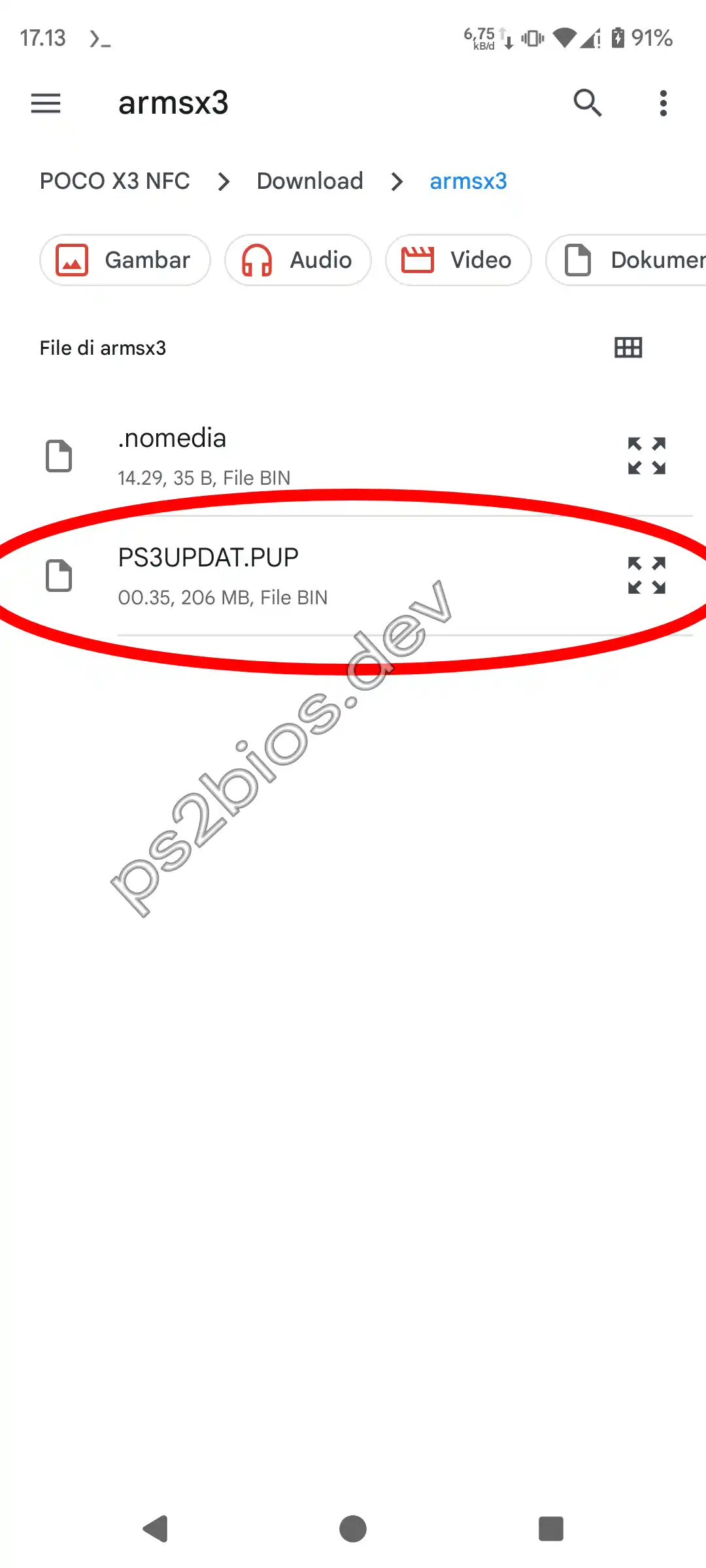
Download PS3UPDAT.PUP and save it in a folder you can find again. Keep it as a PUP file; don't extract or modify it.
Open the firmware install page
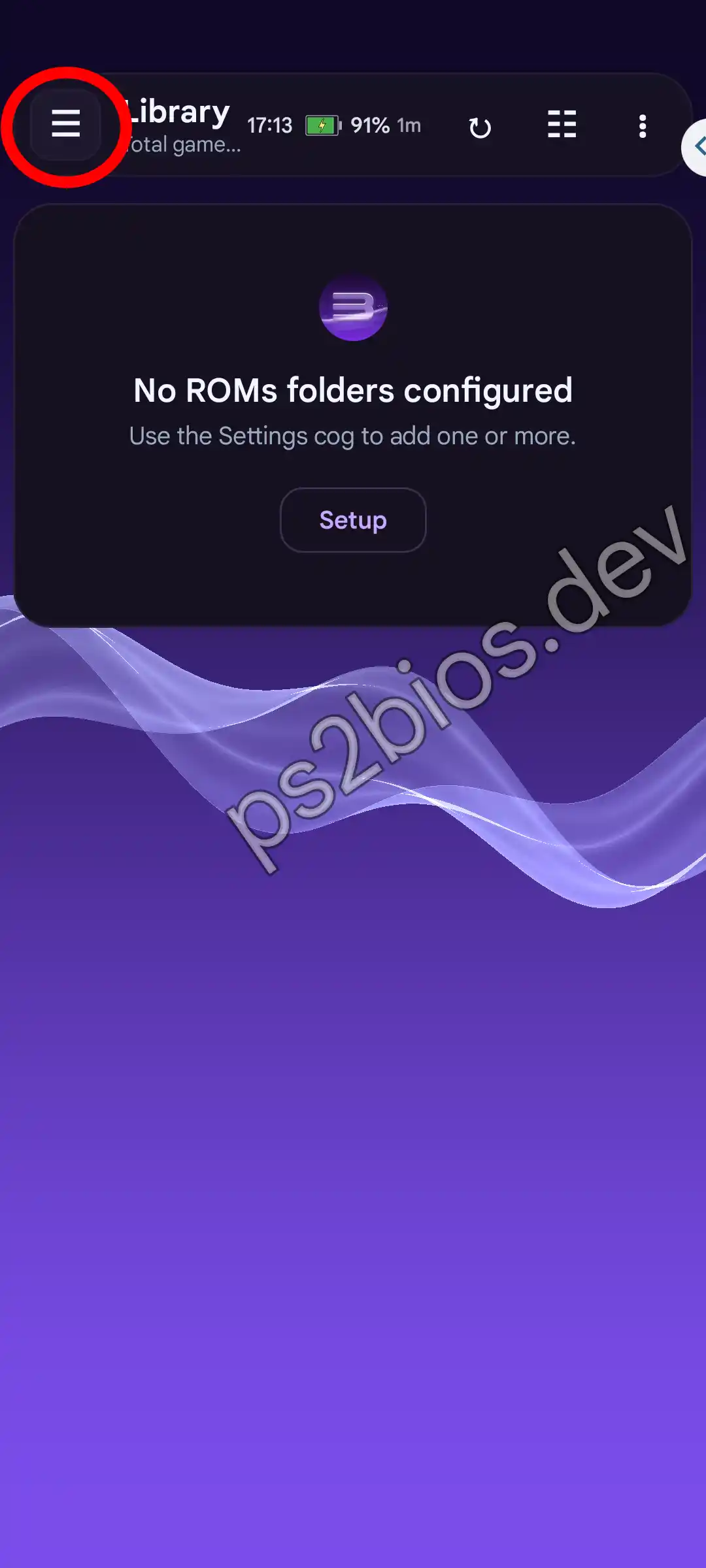
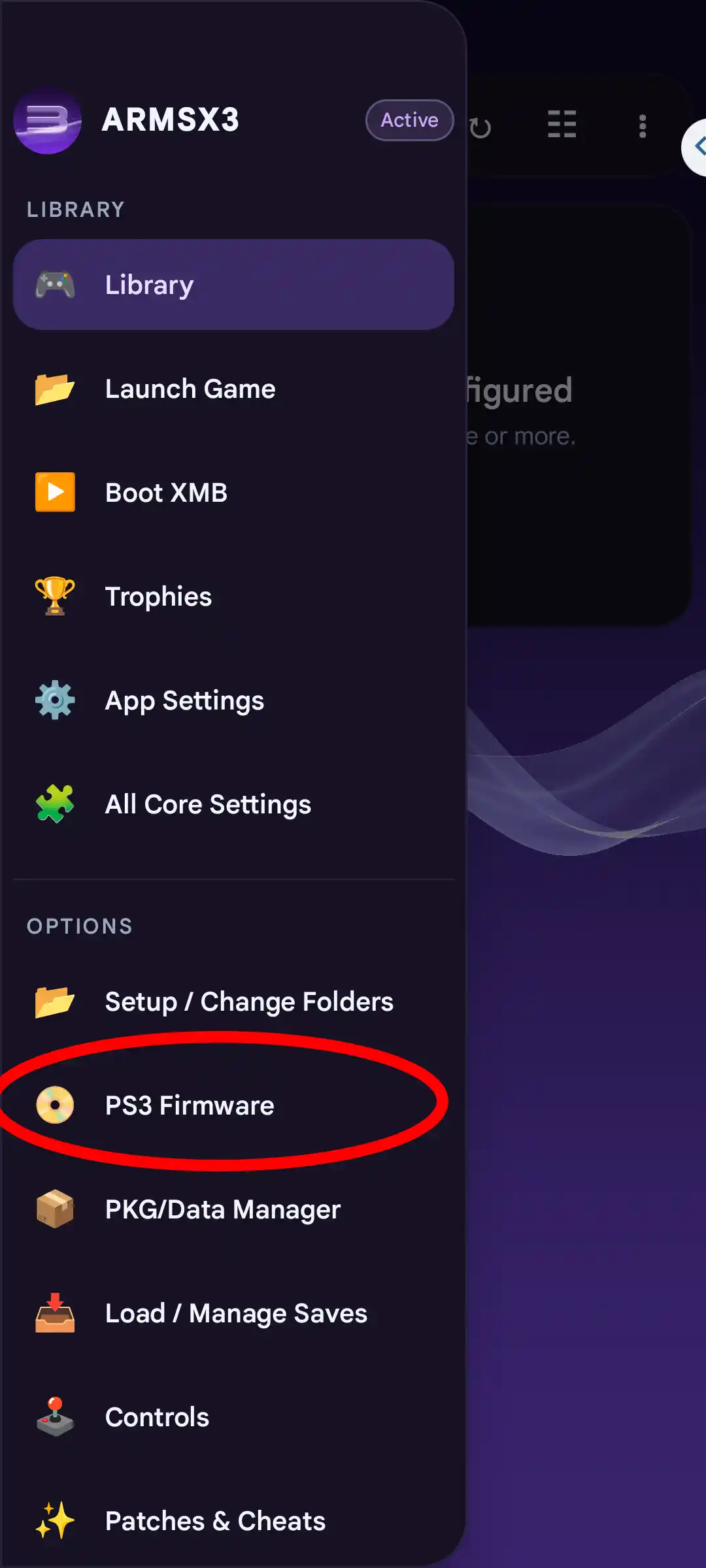
Open ArmSX3, tap the three-line menu icon at the top left, then choose PS3 Firmware under Options.
Select PS3UPDAT.PUP
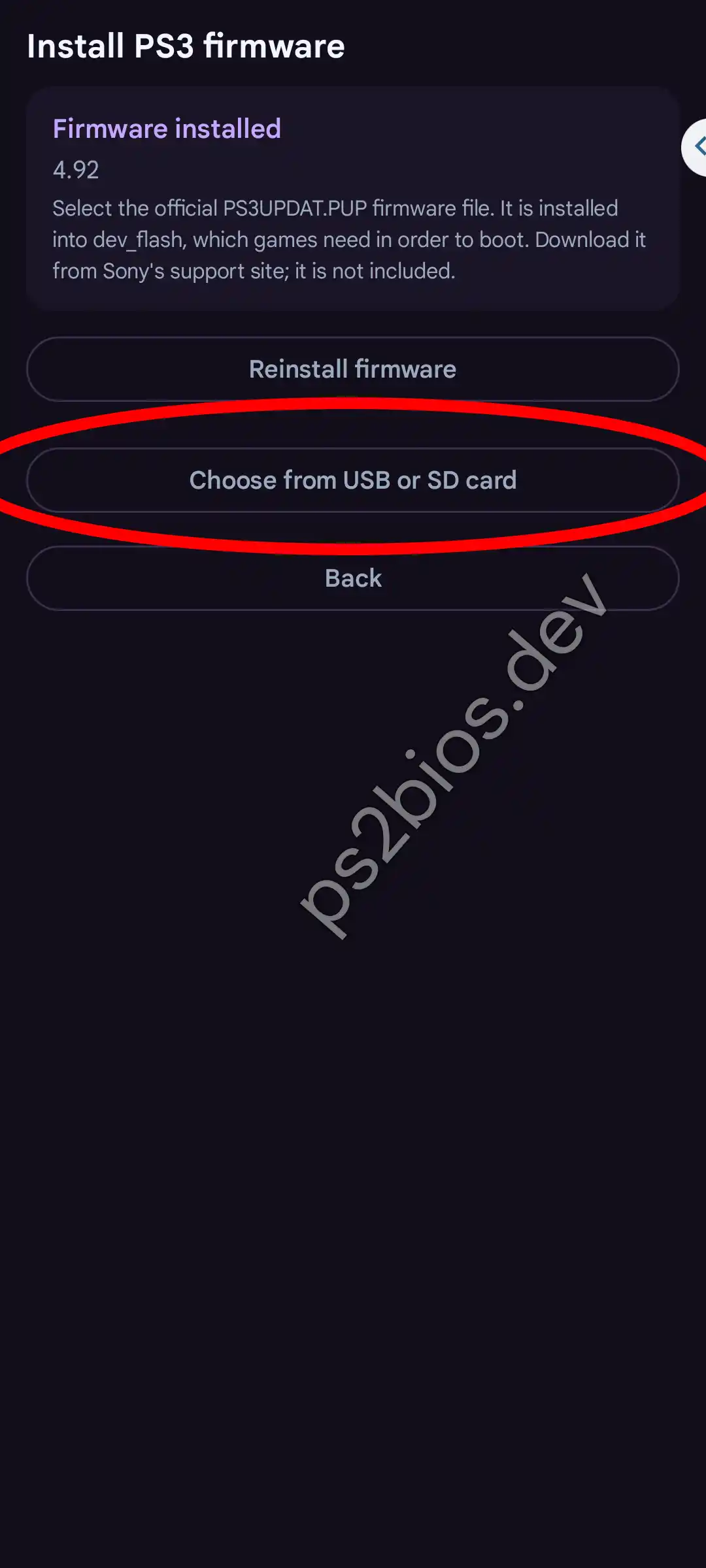
On the Install PS3 firmware page, tap Choose from USB or SD card, then open the folder where PS3UPDAT.PUP is saved and select it.
Wait for the installation to finish
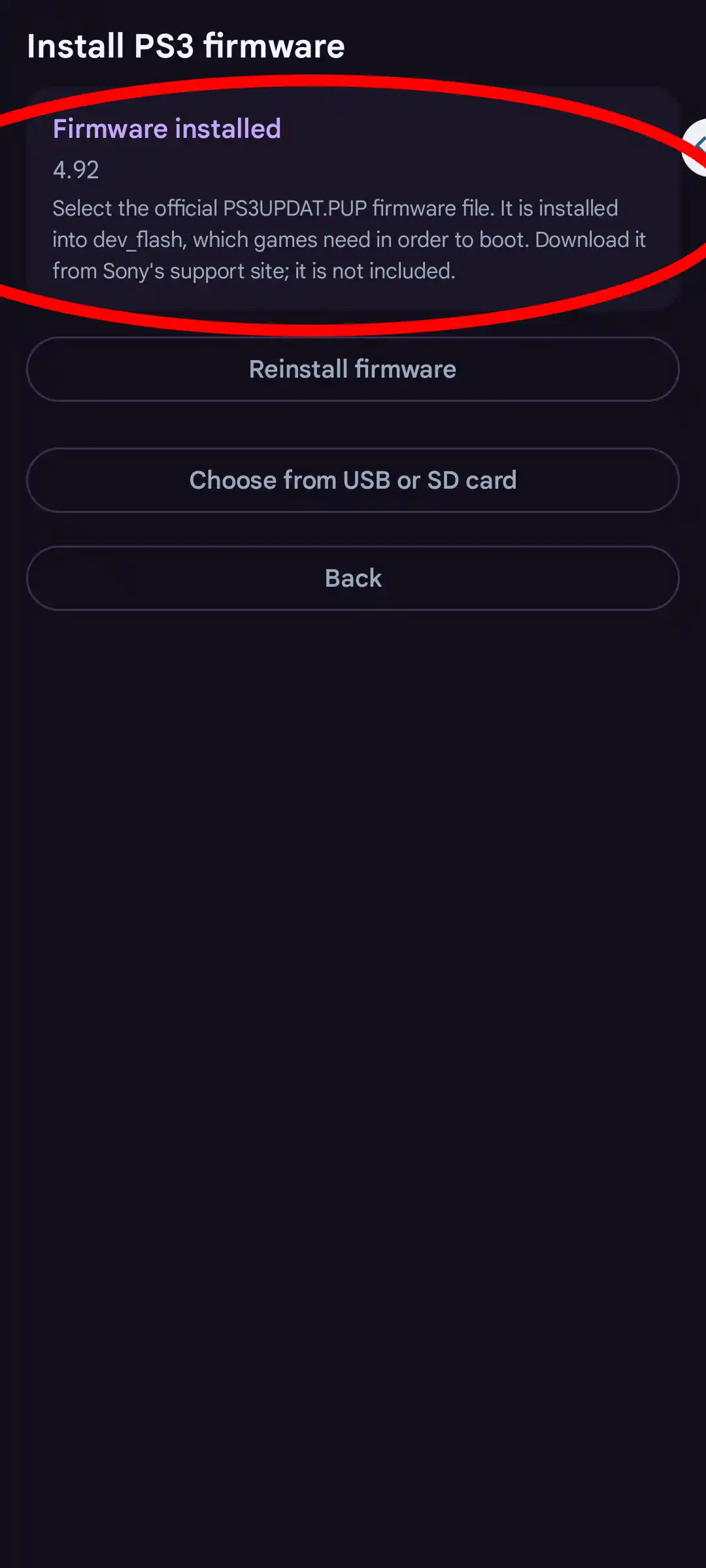
Let ArmSX3 extract and install the firmware modules. It is done when the card at the top of the page reads Firmware installed with the version number. Don't close ArmSX3 while it runs.
Finish setting up ArmSX3
Once the firmware is installed, ArmSX3 can load PS3 games. The first time you launch a game, wait for the module and cache compilation to finish.
PS3UPDAT.PUP directly. Don't extract the PUP file, and don't close the emulator while it installs.
Mengatasi Firmware PS3 Gagal Dipasang
Berikut beberapa langkah yang diperlukan untuk menangani Firmware yang tidak dapat di kenali oleh emulatoratau bisanya berhenti dalam proses pemasangan.
File PUP tidak valid
Coba anda unduh ulang fimrware dari situs ini. Pastikan format file berakhir dengan .PUP, ukurannya sekitar 100MB lebih, dan file modifikasi atau diekstrak oleh aplikasi pihak ketiga.
File tidak terdeteksi
Pindahkan PS3UPDAT.PUP ke folder yang mudah diakses, lalu pilih file firmware melalui File & Install Firmware. Jika masih tidak terdeteksi coba beri izin baca penyimpanan untuk emulator.
Pemasangan terlihat berhenti
Tunggu beberapa menit dan jangan menutup ArmSX3 karena biasanya butuh waktu untuk menjalankan firmware. Pastikan juga bahwa penyimpanan masih mencukupi dan ArmSX3 memiliki izin untuk menulis ke folder datanya.
Game masih menampilkan layar hitam
Dibeberapa kasus Firmware biasanya tidak selalu berhasil saat menjalankan game. Periksa kompatibilitas game, integritas salinan game, driver GPU, dan konfigurasi khusus pada daftar kompatibilitas game PS3. agar mengetahui aoakah game benar-benar didukung.
Apakah Firmware PS3 Sama dengan BIOS PS3?
Tidak, BIOS PS3 sebenarnya tidak ada karena emulator PS3 menggunakan firmware bukan BIOS. Istilah ini biasanya digunakan pengguna untuk FIRMWARE PS3, karena mereka menyamakan bahwa emulator PS3 memerlukan BIOS sama seperti PS2.
Firmware PS3
Perangkat lunak sistem utama resmi yang diperlukan PlayStation 3. Semua emulator PS3 memerlukan ini untuk melalukan emulasi PS3 dan menjalankan beberapa fitur yang disediakan firmware.
BIOS PS3
ArmSX3 tidak membutuhkan file BIOS terpisah seperti beberapa emulator konsol PS1/PS2. Jadi anda harus hindari jika beberapa situs yang menyediakan BIOS PS3 karena ini tidak diperlukan.
Mengapa Firmware PS3 Penting untuk Emulasi?
Berikut beberapa alasan teknis dan fungsi penting firmware PS3 untuk digunakan banyak emulator.
Dukungan Modul LLE
Firmware menyediakan modul Low-Level Emulation (LLE) penting. Emulator menggunakan pustaka ini untuk memproses fisika game, mesin visual yang kompleks, dan panggilan sistem internal secara tepat.
Kompatibilitas Game
Di beberapa game firmware yang tidak cocok, akan mengalami masalah saat memainkan game. Memasang firmware yang kami sediakan akan membantu meningkatkan kompatibilitas dan menyediakan komponen sistem yang diperlukan oleh game dengan update versi terbaru.
Dekode Audio yang Tepat
Firmware PS3 menyediakan komponen untuk menangani codec audio seperti ATRAC3 dan AAC. Komponen ini digunakan emulator ArmSX3 memutar musik, dialog, dan efek suara dengan tepat serta mengurangi suara yang tersendat.
Pengelolaan Data Simpanan
Firmware menyediakan komponen sistem yang penting untuk membuat dan membaca data simpanan PS3. Dengan fitur inj, progres game dapat disimpan dan dimuat dengan lancar di emulator.
Antarmuka VSH/XMB
Pengguna yang sudah berpengalaman memggunakan emulator dapat memanfaatkan firmware untuk membuka antarmuka lama XrossMediaBar (XMB). Dari sana, pengguna dapat mengatur bahasa sistem, mengelola fitur yang didukung, dan mencoba tampilan konsol PS3 di Android.
Ekstraksi Otomatis
Anda tidak perlu mendekripsi file secara manual. Karena ArmSX3 dapat membaca format .PUP secara langsung, lalu mengekstrak dan memasang komponen yang diperlukan secara otomatis.
Tanya Jawab Seputar Firmware PS3 di ArmSX3
PS3UPDAT.PUP from this site.
.PUP extension.
dev_flash virtual partition. We advise against modifying or deleting the contents of this folder to prevent ArmSX3 from force-closing during operation.
Other Articles
Download PS2 BIOS for ARMSX2 Emulator
The PS2 BIOS is essential system firmware required by the ARMSX2 Android emulator to boot up and smoothly run …
PS2 BIOS for PCSX2 Free Download
Download the high-performance PS2 BIOS binaries for the PCSX2 emulator. The absolute cornerstone firmware required to …
PS2 BIOS Download (All Regions) for AetherSX2
The PS2 BIOS is a crucial component required by AetherSX2 to run PlayStation 2 emulation, serving as the essential …
How To Install PS2 BIOS on PCSX2 Emulator
A quick and easy guide on how to set up and install the PS2 BIOS file in the PCSX2 emulator. You'll be able to play …
How to Install PS2 BIOS on AetherSX2 Emulator
A full guide for 2025 on how to install the PS2 BIOS on AetherSX2 for Android. In just a few minutes, you can get your …